
How to Read a Crontab Line: Fields, Ranges, and Special Characters
Updated Sep 2026 · originally published Sep 2026
The crontab entry can look intimidating for the beginners due to its fields and doubts about the correct values and ranges to use. A single crontab creats full schedule with is six columns. Once you can read the five time fields left to right, every cron job stops being cryptic.
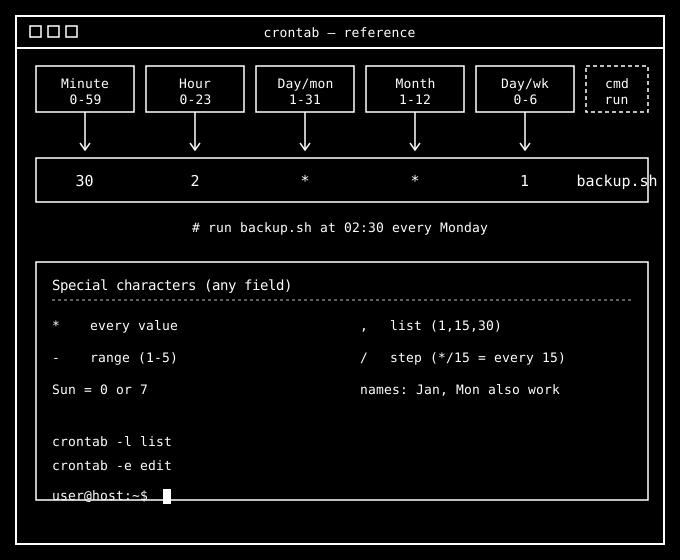
The five time fields
Cron reads each line as five time fields followed by the command to run. Left to right: Remember it as expanding and specifying run time of in a day and the weekday in the last field
Here are the fields and range of values that can be used :
- Minute —
0-59 - Hour —
0-23 - Day of month —
1-31 - Month —
1-12(names likeJanalso work) - Day of week —
0-6, where0and7both mean Sunday (names likeMonalso work)
Everything after the fifth field is the command, passed straight to the shell.
Reading the example
30 2 * * 1 /home/user/backup.sh
30minute2hour*any day of the month*any month1Monday
Result: run backup.sh at 02:30 every Monday.
Special characters (any field)
| Symbol | Meaning | Example |
|---|---|---|
* | every value | * * * * * runs every minute |
, | list of values | 0,15,30,45 |
- | inclusive range | 1-5 (Mon-Fri) |
/ | step | */15 = every 15 units |
One gotcha: when both day-of-month and day-of-week are set (neither is *), most cron implementations run when either matches, not both.
Quick reference
0 * * * *      # top of every hour
*/5 * * * *    # every 5 minutes
0 9 * * 1-5    # 9:00 AM on weekdays
0 0 1 * *      # midnight on the 1st of each month
Use crontab -l to list your jobs and crontab -e to edit them.
Want the full breakdown — user vs system crontabs, /etc/cron.d, environment variables, logging, and common scheduling recipes? Read the complete guide: Crontab Format & Syntax Explained.